Tracks view
What do I have, and what is missing.
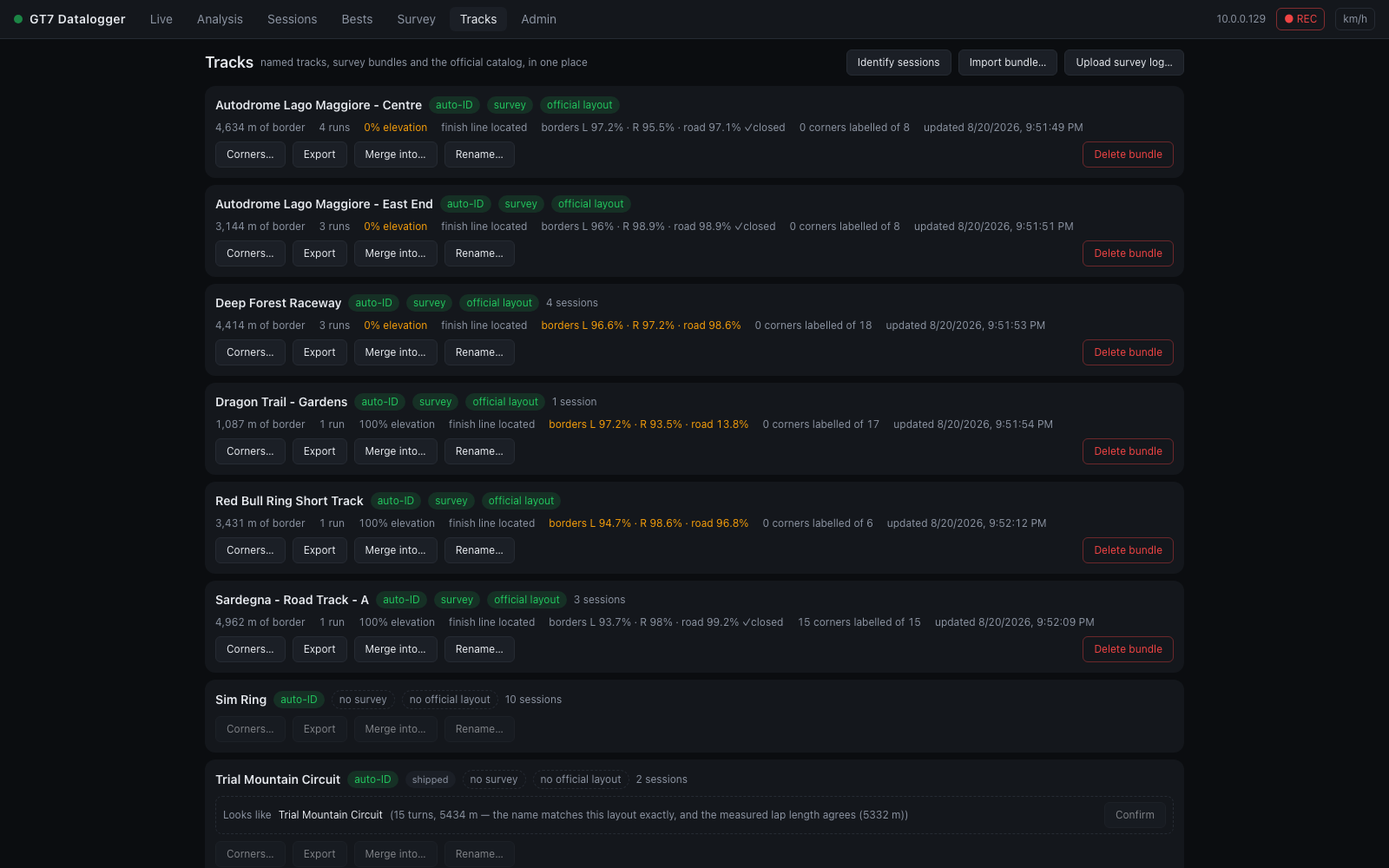
The page reads top to bottom: a Needs you list of what blocks auto-identification, sync or coaching; a readiness table of every circuit; and, beside it, a checklist for the selected circuit.
Three separate things can be true about a circuit, and until this view existed nothing on any screen showed them together:
| you have | which means | where it lives |
|---|---|---|
| a named track | a five-number signature sessions can match against — one you wrote, or one that shipped with the app | the tracks table |
| a survey bundle | its borders, elevation and finish line are mapped — and sessions driven on it identify themselves | data/track-bundles/ |
| an official layout match | its real length and turn count are known | backend/data/tracks.json |
Having one is not having the others: a named track you have never surveyed has no map. The Tracks tab lists every circuit this installation knows anything about, merged across all three, with the gaps called out.
Identifying sessions
Most circuits recognise themselves before you have done anything at all: the app ships signatures for 78 GT7 configurations, so a session at one of them is named on its first completed lap. Those circuits say named by shipped signature (and the checklist explains it) to keep them apart from circuits you named yourself — and a name you write always wins over one the build supplied, so naming a circuit yourself is how you correct a shipped name you disagree with.
A surveyed circuit recognises itself too. When a new session's first lap has no matching signature, the lap is compared against the survey bundles — did this lap drive on this tarmac? — and a confident match names the session. That is what makes the track badge, the surveyed road under the race line, category bests and corner labels appear without anyone naming anything. See Track identification.
Sessions recorded before a circuit was surveyed never got that chance. Identify sessions (top right) re-runs identification over every unlabelled session in your history and names the ones it can now place — whether that is a circuit you have since mapped, one you have since named, or one the app ships a signature for. Sessions with no confident match are left alone — an unlabelled session is honest, a mislabelled one is not.
Needs you
The panel at the top gathers everything that is waiting on a decision or a drive, each with the button that fixes it:
- confirm the layout — a circuit that looks like an official GT7 configuration (see below), with Confirm and Not this; Survey this track instead when there is no bundle yet to record the match in.
- went nowhere — a survey run saved as a log only, with no circuit named (see below), with Assign to a track… and Download.
- road coverage n % — a bundle with less than half the road found, with Survey again.
- no corners labelled — the circuits whose corner reports and braking callouts stay empty until they are, with Label corners (or Label next).
- Track sync — not reaching the server — when tracks sync is on and failing, with Open Settings › Sync.
It says Nothing waiting on you. when there is nothing.
The readiness table
Filter it with All, Needs work, Ready and Not surveyed, or type in Find a circuit. Each row shows:
- Circuit — the name, and under it the turn count, length and when the bundle was last updated; or, with no bundle, named by shipped signature / named by you from a lap.
- Ready — four pips for the steps from a name to working coaching, in the order they unlock each other: identifies sessions, surveyed, official layout, corners labelled. Under them, Ready or the next step (Next: survey it, Next: confirm layout, Next: label corners). Hover for the list.
- Coverage L · R · road — the compiled score: each border's surveyed share of the boundary itself, and road %, the share of surveyed border with the opposite border found across from it. Measured against the boundary, not the path you drove — a circuit you lapped fifty times with one unmapped chicane still says so. See the compiled geometry.
- Corners — labelled, out of how many the official catalog says the circuit has once the layout is confirmed.
- Sessions — how many sessions were driven there.
- Sync — with tracks sync on, where the bundle stands (see Sync status).
Circuits that have only a shipped signature and nothing else get no row — they would be 78 lines restating the catalog, burying the rows that record an actual disagreement. The footer counts them instead, so "nothing here knows that circuit" and "it is already waiting for you" stop looking identical.
The checklist
Click a row to open its checklist on the right: one line per fact, ticked, flagged or still to do, with the fix beside it.
- Identifies sessions — and why: you named it, a shipped signature did, or its surveyed road does. A circuit named only by a shipped signature says so; naming it yourself from a lap in Sessions replaces it.
- Survey — metres of border evidence (one record per metre per side), how many survey runs are behind it, how many different installations contributed (see importing), and when it was last updated.
- Borders — the left, right and road coverage, and whether both sides form a closed loop.
- Elevation — the share of mapped metres that know their height. Bundles started before elevation capture sit near zero and only fill in by re-driving: this number is a fact about the data, not a bug.
- Finish line — located from lap rollovers, which GT7 does exactly on the line.
- Corners — how many are labelled, with Label corners / Edit corners.
- Official layout — confirmed, suggested (with Confirm and Not this), or not matched.
- Sync — with tracks sync on, the bundle's chip and what it means, with Sync now when it is queued or failed.
Under the checklist: Export bundle, Merge into…, Rename…, Re-check laps and Delete bundle….
Runs that went nowhere
A survey with no circuit label saves no bundle at all. A run that starts before the track is identified, and never gets named, accumulates border evidence against nothing — the author lost about 55 minutes of driving that way, with no screen anywhere reporting it.
Those runs are not gone: the JSONL log of a survey is a complete record, and the Tracks view lists every orphaned one under Needs you with an Assign to a track… button. Assigning replays the log through the normal merge path, so the result is identical to having named the circuit while driving.
(The same job from a terminal, for a log that has been moved off the machine
that recorded it, or for a dry run first:
python scripts/jsonl_to_bundle.py <log.jsonl> <data_dir> "<Track>".)
Confirming the official layout
When the name looks like an official GT7 configuration, Needs you and the checklist offer the match with its reasoning — the name, and the measured lap length where the circuit has also been named. Not this rules a suggestion out (on every device) and offers the next-best layout, if one is close enough; Suggest again in the checklist forgets the ruled-out ones.
You confirm it; the app never applies it silently. GT7 broadcasts no track identifier, and the catalog carries no world coordinates, so nothing on either side identifies the other and the match is genuinely a guess. A wrong one would attach the wrong turn count and quietly mislead every "15 of 17 corners labelled" readout afterwards.
Confirming stores the match in the bundle, so it travels with export.
Two names, one circuit
Bundle names are typed by a driver and then slugified, so "Lago Maggiore - East" and "Lago Maggiore - East End" become two bundles of the same tarmac, each with half the evidence. Rename… onto an existing name merges them: one circuit is one bundle.
Re-checking laps
A lap's off-track verdict against the surveyed edges (see the Sessions view) is decided against the survey as it was when the lap was saved. The survey keeps changing, so the app re-judges every lap on a circuit whenever its bundle does: two minutes after a survey run's last save, and at once after a merge, a rename or a delete. A corrected survey clears the flags a bad one caused; a deleted one takes its verdicts back to unknown.
Re-check laps in the checklist forces that pass for one circuit and says what it found — "Re-checked 143 laps on Deep Forest — 7 verdicts changed", or that every verdict stands. It reads every lap's telemetry, so on a circuit with hundreds of laps it takes a few seconds. It is there for when you do not want to wait, and for a survey deleted before the app did this by itself.
Labelling corners
Label corners (or Edit corners) opens the refine view: the circuit's surveyed map, with clicking placing corner apexes.
This exists because detect_corners() runs per lap, off the racing line.
A driver who straightlines an S takes the same tarmac on a shallower arc,
detection stops calling it a corner, and every corner after it renumbers — so
"turn 4" means a different piece of tarmac from one lap to the next. Anything
built on comparing corners across laps or sessions needs numbering that holds
still, and hand-labelled corners do.
Click Place corners and work around the map from the first corner after the start line, then name them. Per corner you can optionally mark turn-in (entry) and exit, and set the direction. Sections below the corner list mark named stretches (straights, mostly) that the lap analysis document times. Sectors below them are where each sector ends, in track order — click Add, then click the map on the split line; the last sector runs to the start/finish line, so two boundaries make three sectors. GT7 broadcasts none, so these are what the sector times in Analysis are read off; a circuit without them is split into thirds of the lap.
The quicker way is From splits…: some race screens show each
sector's time as the lap is driven, and a lap then says where its sectors end.
Pick one of your laps at the circuit, type each sector's time as the game
showed it (0:25.123, or just 25.123; the last sector is not typed — it is
what is left of the lap), and Place boundaries puts each one where that
lap was at that moment, to within a tick of the game's clock. Check the map,
then Save.
Corners are stored in the bundle, not the database: they are knowledge about the circuit, so they travel with export and import, and they are a large part of what makes someone else's bundle worth pulling.
Once labelled, they take over from detection everywhere:
- the Analysis race-line map and corner detail use them, so corner 4 is corner 4 in every session;
- the Race Engineer speaks the name — "you lost three tenths in the Parabolica" rather than "in turn four".
Importing and sharing
Contributed bundles live in their own repository —
gt7-datalogger-track-data
— with a browsable map of every circuit in
it. A fresh
installation — one holding no bundles yet — pulls every circuit from it once,
in the background, on its first start, so the known circuits are named and
drawn from your first lap. After that, Import ▾ → Pull all from shared
pulls everything again (only what changed is added), and Import ▾ → Pull
from shared lists every circuit the repo offers, says whether you already
hold a bundle of it, and Pull fetches and merges one. (The repo is
configurable via GT7_SHARED_BUNDLES_URL; setting it empty turns pulling off,
the first-start pull included. An installation offline at its first start
tries again at the next.) Alternatively, grab the pack
from the repo's latest release, unzip, and run its import_into_app.py
against your datalogger; or download a single track from the site and use
Import ▾ → Import bundle….
A pull brings the repo's corrections for the circuit along with its bundle, when it keeps some (the Pull from shared list says corrected): the areas an editor decided the map should not draw — a pit wall recorded as the border, a stretch surveyed on the wrong side — and the borders somebody drew in, a bridge across a gap nobody has driven. They are the repo's decision about the evidence rather than evidence, so they are never merged into your bundle: the app keeps the repo's file beside it, compiles the map from what is left, and replaces the file on the next pull (a circuit the repo has stopped correcting loses it). The upshot is that the road drawn and judged against here is the road the repo's own map shows. The pack's import script does the same, and the API takes a corrections file directly. Your own evidence is untouched either way, and a correction never travels back up with a sync upload.
The data is separate from the app on purpose: it changes every time somebody drives, and a corrected corner label should not have to wait for a software release.
Sync status
With a sync service connected and tracks switched on (Settings › Sync), your surveys go the other way without a manual step: every bundle with a confirmed official layout is uploaded once it has settled after a change, corner labels included, and each row here carries a chip saying where it stands (the table's Sync column, and the checklist's Sync line).
What goes up is your own evidence: the votes this installation cast, with the corner labels, sections, sector boundaries, finish crossings and confirmed layout. Evidence you pulled from the repo or imported from a friend's file stays in your bundle and never leaves with an upload — the service files every installation under one account and refuses a document that names somebody else's, and the repo only ever wanted the metres you added. So pulling never stands in the way of syncing, and a bundle you pulled but have not surveyed yourself has nothing to send.
| chip | meaning |
|---|---|
| not synced — confirm layout | the bundle has no confirmed official layout, so it cannot be filed. Confirm the Looks like… suggestion (or set the layout) and it queues itself |
| not synced — nothing of yours | every metre in the bundle was pulled or imported; nothing this installation recorded is in it yet. The first survey run here queues it |
| sync in N min | changed since the last upload; it goes once it has been left alone for ten minutes. A running survey keeps resetting that clock, so a run uploads once, after it stops. Sync now in the checklist, or Settings › Sync, sends it at once |
| syncing… | uploading now |
| synced time | accepted by the service; hovering shows the upload id and whether it is still waiting for the next merge run. A word after the time (held, merged) is the service's own status |
| sync rejected | the service refused this document; the reason is in the tooltip. Not retried until the bundle changes |
| sync error | the service could not be reached or failed; retried with backoff |
An entry under Needs you appears when the service cannot be reached at all. Nothing here is required: the shared repo can still be contributed to by exporting a bundle and opening a pull request.
Export bundle downloads the bundle document (see the format reference) — that file is what you contribute. Import ▾ → Import bundle… merges one in; Merge into… in the checklist does the same but forces the incoming document onto that circuit, which is how a friend's slightly-differently-named bundle lands in the right place.
Raw survey runs travel too: every JSONL log has a Download button (Needs you and the collapsed Survey logs section list them all), and Import ▾ → Upload survey log… accepts one recorded elsewhere — assign it to a circuit and it replays through the normal voting path, credited to the installation that drove it. That is the finer-grained sibling of bundle import: a bundle is a circuit's whole accumulated record, a log is one evening's driving.
Merging accumulates fidelity across people rather than picking a winner. Each installation stamps a source id on every vote it casts, so two people who each drove a metre once have between them seen it twice — and re-importing the same shared bundle a second time changes nothing, because each source's own run count is what advances.
Your own corner labels and your confirmed layout match are never overwritten by an import.
Contributing back
The reverse direction — your survey work into the shared repo — is two commands in a clone of gt7-datalogger-track-data (standard-library Python, nothing to install):
python tools/add_bundle.py --from-app http://gt7.local:8000
python tools/build_index.py
then open a pull request. add_bundle.py pulls every bundle out of your
running app (or takes an exported file), validates it, and merges it into
whatever the repo already holds — the same per-source voting merge as
everywhere else, so re-contributing never double-counts and the PR diff is
only the metres and votes you added. Two things matter before you run it:
confirm the official layout (the repo files bundles by official_id and
its CI rejects one without it), and ideally label the corners — the
highest-value part of a bundle after the borders. The intended loop is pull →
drive → contribute: start from the shared bundle, extend it, send back the
difference. Details in the repo's
CONTRIBUTING.
Imported documents are validated field by field before anything is merged: an import writes into the same store the app surveys into, so a malformed or hostile document is rejected outright, not partially applied.