Live view
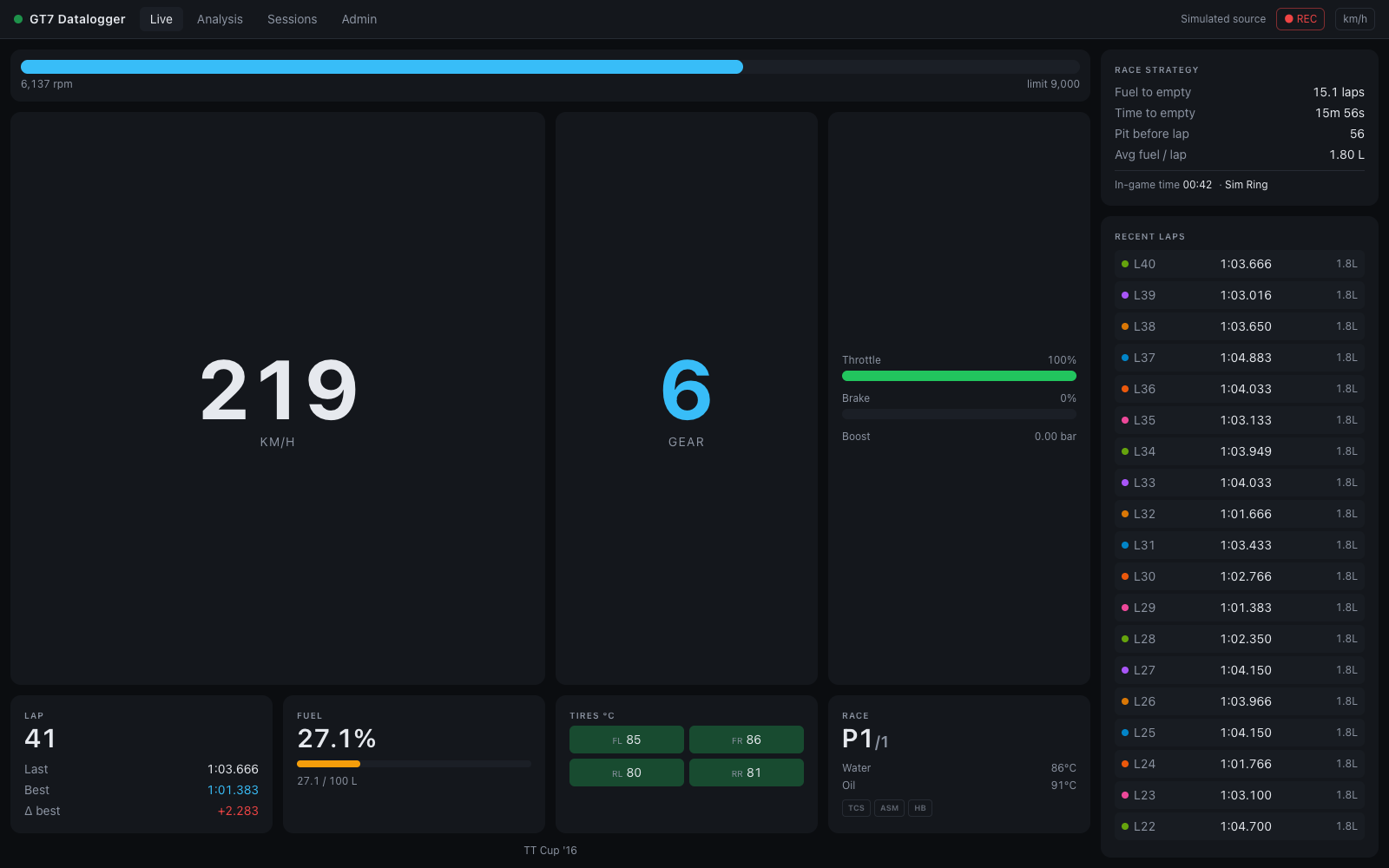
#/live — the default view. Big race readouts that update continuously from the
telemetry stream while you drive.
Context strip
Across the top: the car, the track badge, and a line with the session number, the lap
(lap 4/10, or finished after the flag), the race position (P3/16) and the
in-game time of day, plus paused / not on track when they apply.
On the right, two links to the second-screen pages:
- Race Engineer chip — whether the server's voice callouts are going anywhere: speaking on this browser / a Driver dash / an Engineer page with the verbosity, voice off, or callouts off. Click it to open the Engineer page. The Live view itself never speaks.
- Driver dash ↗ — the driver dashboard.
Alert strip
When something needs attention, a strip under the context line spells it out, most critical first: fuel (Fuel for 2.4 laps — box before lap 12 at 3.10 L/lap.), pit window, water and oil temperature, oil pressure, tires. The triggers are the same as the driver dashboard's alerts. Nothing shows while all is well, or while you're off track or paused.
Readouts
Shift lights — a 24-segment strip filling green, amber, then red from 45 % of the shift point up to it; at the shift point everything lit turns red, and on the rev limiter the strip flashes. Under it: current RPM and the shift point.
Speed — converted to your units setting (toggle km/h ↔ mph in the status bar).
Gear — R for reverse, N for neutral. When the game suggests a different gear,
a gear → N hint appears under the number (amber while you're braking).
Δ to best — the live gap at your current track position to the session-best lap at the same point, with a ±1.0 s bar (green gaining, red losing) and the reference lap's number and time. Before a live reference exists it falls back to the last lap against the best, labelled Δ best · last lap.
Current lap — the running lap time, with Last (and its gap to the best before it, purple for a new best), Best, and Predicted — the best plus the live delta.
Inputs · last 8 s — a rolling throttle (green) and brake (red) trace, with the
current percentages, and boost (x.xx bar) on turbocharged cars.
Fuel & strategy — fuel left / capacity and, once you have completed a lap that burned fuel, laps of fuel projected from a rolling average of the last 3 fuel-consuming laps, with Pit before lap (the last lap you can complete on this tank), Avg / lap, and — in races with a known length — To finish: green fuel OK, or red x.x L short. See Fuel & race strategy for the math.
Tires °C — the four tire temperatures in a 2×2 layout, tinted by temperature:
blue below 55 °C (cold), green 55–95 °C (optimal), red at 95 °C and above (hot), with
the front/rear balance. A TIRE SPIN warning appears when average slip exceeds 1.1×.
Car — water and oil temperature (amber / red at the
alert thresholds), oil pressure, and three driver-aid
pills — TCS, ASM, HB — that light amber while that aid is actively
intervening.
Laps rail
On the right: this session's laps. The lap in progress is pinned at the top with its running time and live Δ; below it, every completed lap newest first with its time and Δ to the session best (the best marked PB in purple; laps that don't count show no delta). The header counts the laps and gives their consistency (σ). Click any lap to open it in the Analysis view; Analyze session opens the whole session.
Status bar (all views)
- Telemetry pill — Receiving (green; Receiving · simulated on the simulator), No telemetry (amber: server up but no telemetry — check console IP / UDP 33740), or Offline (red: the browser lost the server). Click it to open Settings › Connection.
- ● REC / paused — toggle lap recording on/off.
- km/h / mph — units toggle, persisted in the browser.
No telemetry
Before any telemetry arrives — or after 5 s without a frame — the view hands over to a No telemetry page: a live checklist of what is missing (server, browser ↔ server, console discovery, GT7 in a session), with Set console IP and Use simulated source. Start driving in GT7, or switch to the simulator to try things out without a console.