Overlays & streaming
The overlay is a standalone, chrome-less telemetry page at /overlay designed to be
added as an OBS Browser source, opened in TikTok LIVE Studio, or loaded on a phone /
pit-wall tablet.
Layouts are built on a free-placement grid: drag any mix of widgets onto a snapping canvas, size each one from 1×1 up to 4×4 cells, and pick a visual style per widget (digits, bar, gauge, shift lights, …). Named layouts are saved on the server, so OBS gets a short, stable URL — edit the layout later and every browser source updates without touching OBS again:
http://<host>:8000/overlay?layout=race-strip

Building a layout
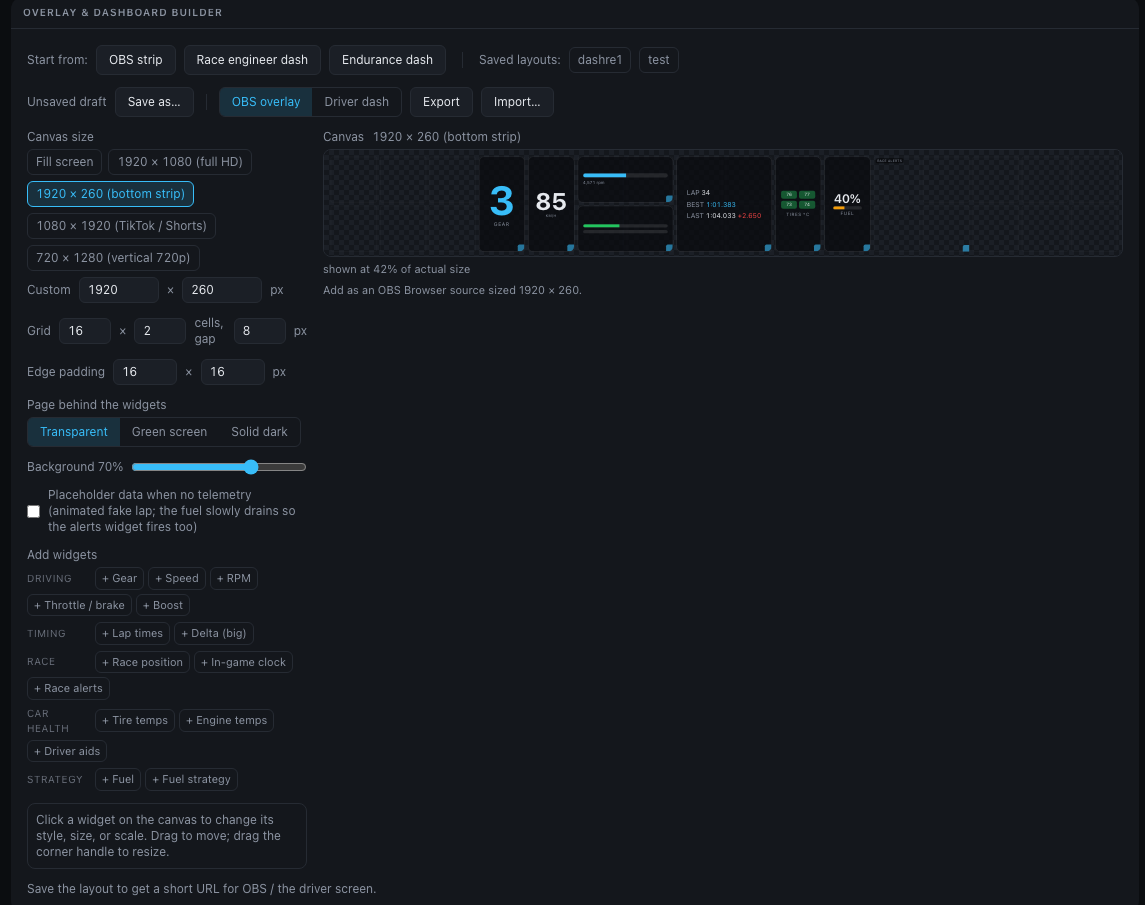
Open the Overlays tab (#/overlays). The left column lists your saved
Layouts (with New) and Start from a preset; the canvas and its URL are in
the middle; the selected widget and the widget palette are on the right.
One-click starting points:
- Race engineer / Endurance — full-screen driver dashboards
- Minimal strip — a transparent 1920×260 OBS bottom strip
- Import JSON… — a layout file, as a new draft
The toolbar above the canvas names the layout and sets its kind — OBS overlay or Driver dash — and its canvas size. It also says where the layout stands: Not saved yet, Unsaved — OBS still shows the saved version, or Saved · live in OBS.
Then work directly on the canvas:
- Drag a widget to move it — the ghost outline snaps to the grid and turns red on a collision. Arrow keys nudge the selected widget; Delete removes it.
- Drag the corner handle to step through the widget's allowed footprints (1×1, 1×2, 2×2, 4×4, …, depending on the widget).
- Click a widget to edit it under Selected widget: visual style, size (cells), fine scale (50–200 %), Duplicate or Remove.
- Add widget from the grouped palette (driving / timing / race / car health / strategy); a widget is placed in the first free spot. A widget already on the canvas is greyed out in the palette — select it and Duplicate to add another, with a different style if you like.
The canvas previews with live telemetry, or with the demo lap when nothing is live.
Canvas options (Canvas & page, under the canvas):
- Canvas size — in the toolbar: Fill, or exact-pixel presets: 1920×1080, Strip 1920×260, 1080×1920 (TikTok / Shorts), 720×1280, Tablet 1280×800 — or any Custom size. The overlay renders at exactly those pixels.
- Grid — columns × rows (up to 24×24) and the gap between cells.
- Edge padding — horizontal and vertical inset.
- Page behind — Transparent (OBS Browser sources with alpha), Green screen (#00FF00 — chroma-key it in apps without alpha support), or Solid dark (phones/tablets).
- Card background — card opacity (0 = bare floating widgets).
- Placeholder data when no telemetry — see below.
Saving — Save layout… stores the layout on the server under a name; the name
becomes part of the URL (/overlay?layout=<name>). Unsaved edits are marked with a
dot in the Layouts list, and Discard throws them away. Rename…, Save
copy…, Export JSON and Delete… sit under the Layouts list. Old URL-style
overlay configs import too and are converted to grid layouts automatically. Presets
saved by the previous builder version are detected on first visit and can be imported
in bulk (Import as server layouts).
Use it — once saved, the bar under the canvas shows the layout's URL with Copy URL and Open preview, and says how to add it to OBS (or, for a dash, to a phone or tablet).
Settings › Overlays & dashboards lists every saved layout with its URL, for copying without opening the builder.
Widgets & styles
| Widget | Styles |
|---|---|
gear |
digit + suggested-gear hint · digit only |
speed |
digits · bar · arc gauge |
rpm |
bar with SHIFT cue · shift-light LED strip · gauge · digits |
inputs |
horizontal throttle/brake bars · vertical bars |
times |
lap / best / last list · last lap (big) · best lap (big) |
delta |
live Δ vs the session-best lap (big number · centered ± bar) |
position |
big P n/total · compact |
tires |
2×2 color-coded temps · temps + slip indicator |
fuel |
percent · bar · laps remaining |
strategy |
fuel summary · pit-window countdown |
clock |
in-game time of day |
engine |
water/oil temps · detailed (+ oil pressure, boost) |
aids |
TCS / ASM / handbrake / rev-limiter badges |
boost |
digits · gauge |
alerts |
stacked warning banners · compact list (see driver dashboard) |
The alerts widget renders nothing while all is well, so it stays invisible in OBS
until a warning actually fires.
Full details for every widget — color thresholds, alert triggers, and behavior in each track condition — are in the widget reference.
Setting up OBS
- Build and save your layout, then Copy URL under the canvas.
- In OBS: Sources → + → Browser, paste the URL.
- Set the source's width/height to the same canvas size you picked in the builder.
- Done — the transparent page mode gives you clean alpha compositing. If your app
renders transparent pages as black, switch to Green screen and add a chroma-key
filter for
#00FF00.
If the stream drops, the overlay renders nothing (an empty source, not a frozen box) until telemetry resumes.
Placeholder mode
The Placeholder data when no telemetry switch (or demo=1 on any overlay/dash
URL) shows an
animated fake lap only while no real telemetry is arriving, with a small amber
placeholder tag. The fake lap's fuel slowly drains so the strategy and alert widgets
get exercised too. The moment real data resumes it switches back automatically — safe
to leave on.
Legacy URL parameters
Overlay URLs from earlier versions keep working unchanged — the whole config lives in the URL instead of on the server:
http://<host>:8000/overlay?w=gear:1.25,speed,rpm,times&layout=strip&size=1920x260&bg=70&align=bottom
| Param | Values | Default |
|---|---|---|
w |
comma list of widget ids, each optionally id:scale (0.5–3) |
gear,speed,rpm,inputs,times,tires,fuel |
layout |
strip · stack · grid |
strip |
scale |
0.5–2 global zoom | 1 |
bg |
card opacity 0–100 | 70 |
align |
top · center · bottom (strip/stack) |
bottom |
size |
WxH exact pixels |
fill source |
pad |
XxY edge inset px |
16x16 |
page |
transparent · green · dark |
transparent (dark for grid) |
demo |
1 for placeholder data |
off |
These render through the original strip/stack/grid flow, pixel-identical to before.
?layout= with anything other than strip/stack/grid refers to a saved server
layout by name or id.