Sessions view
#/sessions — your lap archive. Sessions are created automatically (split on car change
or race restart — see Lap detection & sessions).
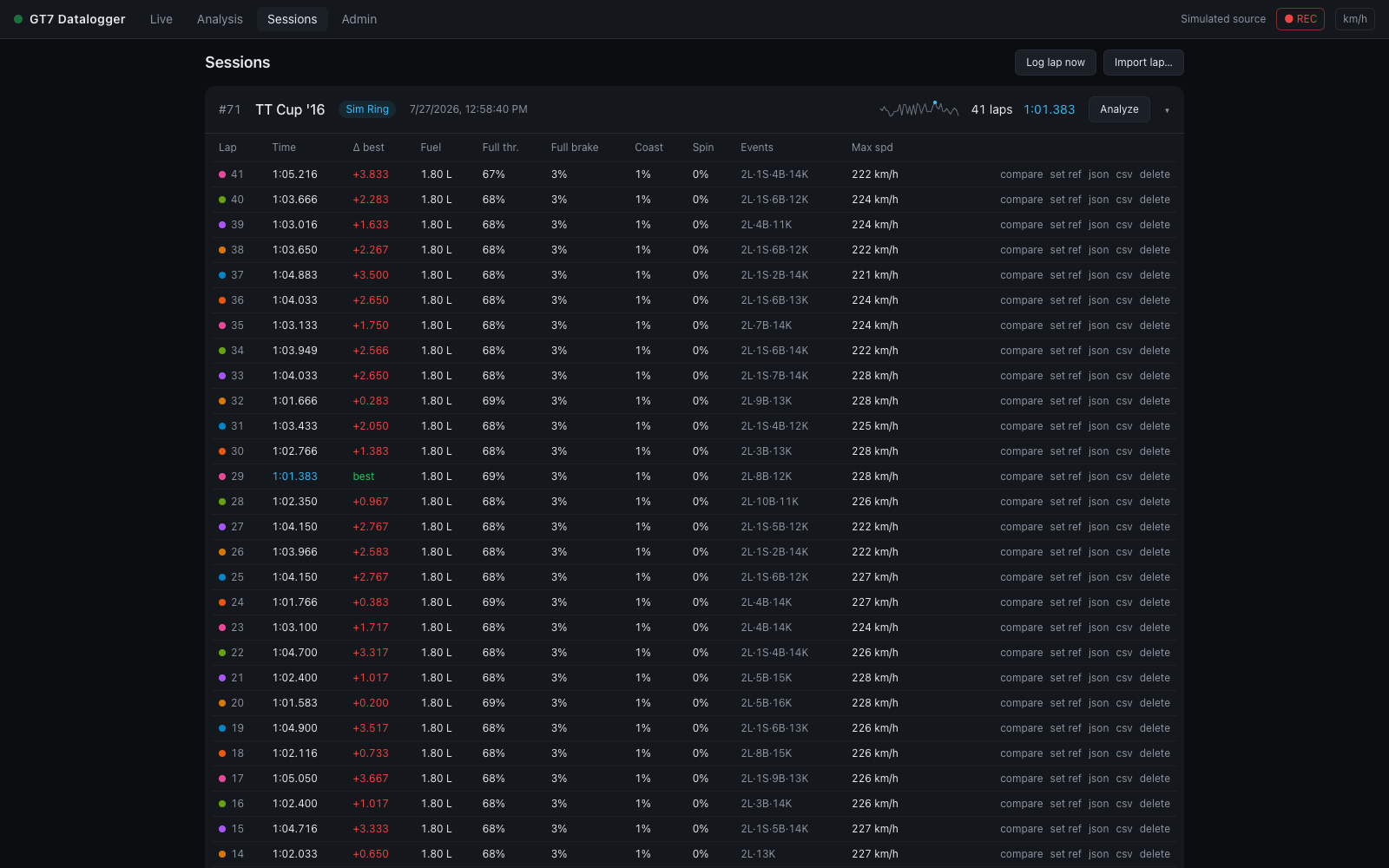
The view is master–detail: the session list on the left, the chosen session on the right. Two sub-tabs sit top left — Sessions and Bests (the Bests board) — with the category chips, a search box and the header actions beside them.
Session list
Sessions are listed newest first and grouped by date (Today, Yesterday, the weekday for the rest of the week, a date before that). Each entry shows the car, its best lap, the track, the session id and start time, and the lap count. The session being recorded carries a pulsing red dot.
The track is shown as a badge when it is known, and as unnamed circuit when it isn't.
Filter by car, circuit or #tag narrows the list as you type; #wet matches the
tag.
Session detail
The header of the chosen session holds:
- the session id, start time (and recording now for the live session), the car and its published figures (manufacturer, drivetrain, aspiration, power, weight, PP — hover for the full list);
- the track badge, or a dashed name track… button when the track is unknown. Naming it fingerprints the circuit from the session's first lap, and every future session on that track is tagged automatically — see Track identification;
- chips for the class, the race result, excluded from bests, and the tags, with + tag and + note;
- Analyze session — opens the session in Analysis, where you pick the laps to compare;
- Export ▾ — Session ZIP, Session analysis, All laps · CSV;
- ⋯ — Exclude from bests / Include in bests, Name track… (when the track is unknown), and Delete session….
Under it, a stat strip: Best (and which lap), Average of the counting laps, Consistency, Within 0.5 s (how many counting laps are within half a second of the best), and Fuel per lap — with the fuel left in the tank for the session you are driving.
Consistency is the standard deviation of the lap times, taken over the laps that count toward bests only; it needs three of them. Race opening laps labelled excluded · race start do not enter this figure.
Then the Lap time by lap chart — every lap's time in order, the best in purple, a dashed median line and the spread band; its footer gives the spread as a percentage of the median. It is the same chart as Analysis's. Clicking a point ticks that lap in the table below.
Category filter
When GT7 broadcasts the car's class (packet C — "Gr.3", "Gr.4", "N300"…), it appears as a chip on the session and in a strip of filter chips at the top: show me only the Gr.3 runs. The same chips filter the Bests sub-tab. Only classes actually present are offered, so the strip disappears entirely on a history recorded before packet C, and All is the only way back to sessions that have no class at all. A session whose own class is blank — its very first packet was a narrower format — takes the class its laps recorded.
Race results
A session that saw the checkered flag carries its result: a P3/12-style chip in the header, with the race length and — when it can be known — the total race time in the chip's tooltip. The result is written once, at the moment GT7's lap counter passes the race distance, so it means position at the finish:
- A time trial (GT7 reports no positions there) shows no chip — "no race" is kept distinct from finishing last.
- A session that ended mid-race (stream stopped, race restarted) claims no result either, however well it was going at the time.
- The total race time is the sum of the stored lap times, and is only stated when every lap of the race is accounted for — a dropped stream or a mid-race join leaves a gap, and a sum across a gap would be confidently wrong, so the tooltip simply omits it. (GT7 broadcasts no total-time field, and the in-game clock runs at the event's own day-speed multiplier, so neither is a substitute.)
In race sessions the lap table also gains a Pos column — the position each lap was completed in, which is what makes the race readable after the fact: the lap you gained two places on is right there next to its time. Per-tick position is recorded too, as the Race position channel in Analysis.
Notes & tags
The session header edits two user-set fields in place:
- Notes — free text, up to 500 characters: setup changes, conditions, what to try next. + note opens the editor; Save note saves it, Escape cancels. A saved note shows under the car line; click it to edit.
- Tags — short repeatable labels ("wet", "race sim", "testing new diff"). + tag
opens a field; Enter adds the tag. Click a tag to filter the list by it (
#wet), and its × to remove it.
Tags are deduplicated case-insensitively, limited to 40 characters, and may not contain commas. Both fields save through the same admin-gated PATCH as the bests toggle below, and editing one never disturbs the other.
Excluding a session from bests
Each session's ⋯ menu offers Exclude from bests (and Include in bests to undo it); an excluded session says so with a chip in its header. It exists because of replays: GT7 streams a replay exactly like driving — no flag distinguishes them — so watching the time-trial leader's lap records it into your history, and nothing in the telemetry can tell that lap from one you drove. Left alone it would own a row on the Bests board and stand as the class benchmark under your name.
An excluded session keeps every lap, and its laps stay selectable in Analysis —
overlaying your line against the leader's is the whole point of capturing the
replay — but it never owns a Bests row and never provides the
class benchmark. The toggle is admin-gated when
GT7_ADMIN_TOKEN is set, like every other mutation.
Excluding a lap from bests
The session toggle is for laps that aren't yours. For your own laps that shouldn't stand — an off-track moment, contact, a restart, a lap you know was dirty — each row of the lap table has Exclude from bests in its ⋯ menu (or tick several laps and use the bulk bar). The lap leaves every best at once: the session best, the Bests board, the class benchmark, and the Race Engineer's pace and coaching comparisons. The lap is dimmed and an excluded · why? picker appears beside its number — off-track, contact, restart, dirty, pit-out or race start — and the Bests board shows that reason next to the time it replaced.
It works the other way too. The partial-lap guard marks laps it thinks covered only part of the track as partial, including laps that began away from the line. If the guard got one wrong, Count for bests in the lap's ⋯ menu makes it count (kept). Setting a lap back to what the guard says hands it back to the guard, so a lap you excluded and then counted again follows the guard again rather than staying pinned.
Race opening laps are automatically excluded with the reason race start, for both standing and rolling starts. Detection requires lap 1 and a packet during that lap reporting a positive race distance and a position in a field of at least two. A complete opening lap keeps its full-lap verdict; its starting conditions are why it is excluded. Qualifying lap 1 and the first recorded lap of a mid-race join are not excluded by this rule. If race metadata is missing, use Exclude from bests, then select race start yourself. Count for bests can include it again.
Existing sessions with a recorded race result are updated once at startup, leaving any existing manual rulings intact. Older recordings without a confirmed result need a manual ruling.
An excluded lap keeps its row, its telemetry and its place in Analysis. If the lap belongs to the session you are driving right now,
the live session best and the Δ-best reference move with it immediately. The ruling
is admin-gated when GT7_ADMIN_TOKEN is set.
Lap table
Per lap: its colour (the same colour it gets in Analysis charts and maps; the fastest lap is purple), number, time, Δ best (to the session best), position (races only), fuel used, full-throttle %, full-brake %, coasting %, tire-spin %, events, gear high, and max speed. Newest first / Fastest first sorts it.
Gear high is how many corners the lap took in a higher gear than GT7 suggested, of
the corners GT7 suggested a gear for: 2/9 is two of nine. A corner is judged at its
slowest point, against the last gear GT7 suggested on the way in, and every lap is
measured through the corners of the session's quickest lap that counts, lined up with
it as Analysis lines laps up — so with that lap as the
reference, a row reads what Analysis's Tuning panel and gear shading say about the same
lap. A dash is a lap GT7 suggested nothing on, or one recorded before suggestions were
kept. The figures are worked out when the table is shown, so ruling a lap in or out of
the bests, which can change the session's quickest lap, re-measures them all. When
GT7 fills the suggestion has not been checked against a console yet.
Columns that never change are hidden. A column that reads the same on every counting lap — the same fuel use on a fixed-fuel run, 0 % spin — is dropped, and a line above the table lists what was hidden and its value (Same on every lap, hidden: fuel 1.80 L · spin 0%). A column no lap has anything for — position outside a race, gear high where GT7 suggested nothing — is dropped without being listed, and left off the Columns… menu. Columns… shows or hides any other column by hand; Automatic — hide what never changes goes back to the default.
A lap that does not count toward bests is dimmed and labelled: partial, kept, or excluded · reason (see above). A salvaged lap carries ⟲.
The lap in progress. While you are driving the session, the lap being driven is pinned above the completed laps (in progress), its time and Δ to the session best ticking live. It joins the table as a normal row when it completes.
The Events column is a compact code — 2L·1S·3B·1K means 2 lockups, 1 wheelspin,
3 suspension bottomings, 1 kerb strike; – means a clean lap.
Off-track excursions ride in the same column, as red ⚠ counts, and can carry two
figures, because two different judges watch the lap (hover for the words). The first
counts excursions by GT7's own per-wheel surface
flags (three or more wheels on the loose) — which are blind to paved run-off:
running wide over asphalt reads as tarmac and stays "clean". The second
appears once the circuit has been surveyed well enough
(≥ 50 % of the road resolved): the lap's positions are judged against the
surveyed edges, and sustained excursions beyond them count even on
pavement. Unsurveyed stretches never count against a lap, and laps recorded
before the session was identified are re-judged the moment it is. Where the
circuit crosses over itself, the lap's elevation says which level it was on;
laps recorded before elevation was stored (0.6.1 and earlier) are judged
against both levels there and get the benefit of the doubt. A lap is clean
only when both judges agree.
The survey's verdict follows the survey. Whenever a circuit's bundle changes — a survey run stops, a bundle is merged in, renamed or deleted — every lap ever driven there is judged again against the road as it now is, so a lap a bad survey flagged reads clean again once the survey is corrected, and a lap judged against a bundle since deleted goes back to unknown on that count. The surface-flag verdict is GT7's own and never moves. Re-check laps on the Tracks view forces the pass and says how many verdicts changed.
Tick laps (the checkboxes, or click a row) to act on several at once: a bar appears at the bottom with Exclude from bests, Export laps (one JSON file per lap) and Delete…. Ticking is only for acting on laps — Analysis always opens the whole session, and the comparison is picked there.
Each row's ⋯ menu:
| Action | What it does |
|---|---|
| Open in Analysis | opens Analysis with this lap vs the session's best (best as reference) |
| Set as reference | opens Analysis with this lap as the reference |
| Export JSON | downloads the lap as gt7-lap-<id>.json — the full 60 Hz recording, shareable and re-importable |
| Export CSV | downloads a MoTeC-compatible CSV for MoTeC i2 or Excel |
| Exclude from bests / Count for bests | see above |
| Delete… | removes the lap and its telemetry (confirmed, irreversible) |
Exports
Export ▾ → Session ZIP in the session header downloads the whole session as
gt7-session-<id>.zip: every lap's .json file plus a session.json with the car,
circuit, tags, note and race result — a backup or a hand-off in one click. See
Session archive.
Export ▾ → Session analysis downloads gt7-session-<id>-analysis.json, the
session's lap analysis: every lap measured corner by corner against the session's
best lap, in one small file. For each corner of each lap it says where the brake went
on and came off, how hard it was pressed and whether it was still on when the car
turned in; the slowest speed and where it was; where the throttle came back and
reached full; the time lost in the corner and on the straight before it; how far off
the best lap's line the car ran; and, on a surveyed circuit, how much road was left
on each side. It also carries each lap's fuel, tyre temperatures and aids use, the
upshift RPM per gear, and how consistent each corner was across the session.
It is a file to hand to something that will read it — a coach, a spreadsheet, an
assistant — rather than one to look at: about 100 KB where the session's recordings
are tens of megabytes, with every number labelled. The same file is inside the
session ZIP as analysis.json. See
Lap analysis format.
Export ▾ → All laps · CSV downloads one MoTeC-compatible CSV per lap.
⋯ → Delete session… removes the session and all its laps. The session being recorded is protected while recording is on, through pauses, pit stops and connection drops alike: pause recording with the ● REC button in the status bar first, and the view says so if you try without. Deleting it then also discards its unfinished lap, and recording again starts a fresh session. Older sessions can be deleted while recording continues.
Header actions
- Log lap now — saves the in-progress lap immediately without waiting for the start line. Handy for capturing a partial run or a test.
- Import lap… — load a
.jsonlap file exported from any GT7 Datalogger instance. Older v1 files import cleanly; the newer per-corner channels are simply absent and the charts skip them. Events and aid metrics are recomputed from the samples on import. The lap lands in the currently live session when one is open (otherwise a fresh "imported" session), and keeps the verdicts it was exported with — a partial or excluded lap stays that way — so otherwise it counts toward bests like any lap. Someone else's lap belongs in a session you exclude from bests. A session archive's lap files import one at a time the same way.
Recording control
The ● REC / paused toggle in the status bar pauses lap recording globally — the live view keeps streaming, but nothing is written to the database until you resume.
See Lap file format for what's inside the JSON and CSV exports.